

Retail Price Computing Scale for Daily Business Use
Retail Price Computing Scale makes weighing and price calculation easier for busy sellers. It combines both functions in one practical machine. Shops can use it when selling suitable goods according to weight.
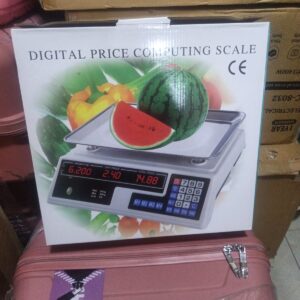
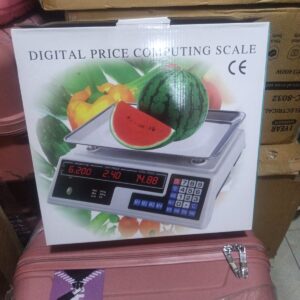
With a maximum capacity of 40KG, the scale handles many common retail weighing tasks. Its front panel also shows a minimum load of 200g and a 2g division. Clear digital sections display weight, unit price and total price.
Easy Price Computing for Shops
Selling products by weight often requires quick calculations. This scale helps make that process simpler.
Place a suitable product on the weighing platform to check its weight. Next, enter the required unit price using the keypad. The scale then shows the calculated total price in a separate display.
As a result, sellers can see the main transaction figures on one machine. This can make daily counter work more convenient.
40KG Maximum Weighing Capacity
A maximum capacity of 40KG gives the scale a useful range for many retail businesses. Grocery shops, produce sellers and market stalls can use it for suitable products.
Always keep the load within the stated limit. Products weighing more than 40KG need a scale designed for heavier loads.
Careful use also helps protect the weighing platform from unnecessary strain.
Clear Digital Display
Three display sections make important information easy to find. One section shows the weight, another shows the unit price, and the third shows the total price.
Because each figure has its own area, the operator can follow the transaction more easily. Customers can also see the displayed information when the scale is positioned correctly.
Clear figures are especially useful during busy selling hours.
Simple Numeric Keypad
A numeric keypad sits on the front control panel. Sellers can use it to enter the required price information.
The familiar number arrangement makes the controls easy to understand. Several extra function buttons are also available on the panel.
In addition, the controls sit close to the displays. This keeps the main operating area together and makes everyday use convenient.
Useful Memory Buttons
Memory buttons marked M1, M2, M3, M4 and M5 are included on the control panel. They provide access to the scale’s available memory functions.
These buttons may help with regular shop operations when used according to the product instructions. However, the exact setup process should follow the supplied manual.
Learning the basic controls before busy trading hours can make daily operation smoother.
Wide Weighing Platform
A broad platform provides space for placing suitable products during weighing. Its flat design works well for many everyday shop items.
For better results, position goods near the centre of the platform. Make sure nothing nearby touches the product or weighing surface.
Boxes, walls or other objects should not press against the platform while the scale is operating.
Great for Grocery Shops
Grocery shops often sell different goods according to weight. A price computing scale can make these transactions more organized.
Staff can weigh a suitable product and enter its selling price from the same machine. The total price then appears on the digital panel.
Because the main functions are combined, the scale can become a useful part of the checkout or weighing area.
Suitable for Fruit and Vegetable Sellers
Fresh produce businesses can also use this scale for everyday weighing. Fruits and vegetables are commonly sold in different quantities, making a digital scale useful.
Sellers can place suitable produce on the platform and check the displayed weight. After entering the correct unit price, the machine calculates the total.
This simple process works well for produce shops and market stalls.
Practical for Market Businesses
Market sellers need equipment that fits easily into their working area. This scale has a compact countertop design that can suit many stalls and shop counters.
Its keypad and displays are located at the front for convenient access. Meanwhile, the weighing platform sits above the control panel.
Together, these features create a simple setup for regular business use.
Main Retail Price Computing Scale Features
• Maximum weighing capacity: 40KG
• Minimum weighing load: 200g
• 2g division indicated on the scale
• Digital price computing function
• Separate weight display
• Separate unit price display
• Separate total price display
• Easy-to-use numeric keypad
• M1 to M5 memory buttons
• Broad flat weighing platform
• Compact countertop design
• Suitable for regular retail weighing
• Useful for grocery and produce businesses
• Practical for market sellers
Stable Countertop Placement
Good placement is important when using a weighing scale. Choose a firm, flat and level counter before setting up the machine.
Leave enough free space around the weighing platform. Nearby boxes, walls or products should not interfere with its movement.
A stable position also creates a better working area for staff who use the scale throughout the day.
Easy Daily Cleaning
Regular cleaning helps keep the scale neat, especially when it is used for fresh produce. Remove loose dirt and small pieces of product from the platform after use.
Use suitable cleaning methods for the outer surfaces. At the same time, keep water away from the electronic sections.
Following the supplied care instructions will help you maintain the machine properly.
Protect the Scale from Overloading
Never place more than the stated 40KG maximum load on the platform. Excess weight can put unnecessary pressure on the weighing parts.
Heavy items should also be placed down carefully rather than dropped onto the surface.
When a product exceeds the scale’s capacity, use another machine designed for heavier loads.
Useful for Different Retail Products
Many businesses sell products according to weight. For that reason, a price computing scale can serve several types of retail environments.
Grocery shops can use it for suitable goods, while fruit and vegetable sellers can use it for produce. Market businesses may also find it useful for regular customer transactions.
Always make sure the product being weighed falls within the scale’s stated limits.
Simple Information at a Glance
The display layout keeps the three main figures separate. Weight appears in one section, while unit price and total price have their own areas.
This arrangement helps the seller read information without searching through one crowded screen.
During busy periods, a simple display can make the weighing process easier to follow.
Why Choose a Retail Price Computing Scale?
A Retail Price Computing Scale provides more than basic weight information. It also supports price calculation for suitable products sold according to weight.
Its 40KG capacity makes it useful for many everyday retail tasks. The keypad provides convenient price entry, while separate displays keep the figures organized.
A broad platform and compact design complete the practical setup.
A Smart Addition to Your Shop
Good equipment can make everyday shop tasks easier to manage. When weighing and price calculation happen on the same machine, staff can work from one control panel.
This scale is suitable for businesses that regularly handle goods sold according to weight. Its simple layout also makes the main controls easy to locate.
For growing shops, practical equipment like this can support a more organized counter area.
Order Your Retail Price Computing Scale
Choose a Retail Price Computing Scale for convenient everyday weighing and price calculation. The machine has a maximum capacity of 40KG, a stated minimum load of 200g and a 2g division.
Separate digital sections show weight, unit price and total price. In addition, the numeric keypad and memory buttons provide convenient controls for everyday use.
Order your 40KG Retail Price Computing Scale from Pixmart Enterprises for grocery, produce, market and other suitable retail weighing needs.



Reviews
There are no reviews yet.